Axis External Logo
Axis External
Official Website

Axis External Executor

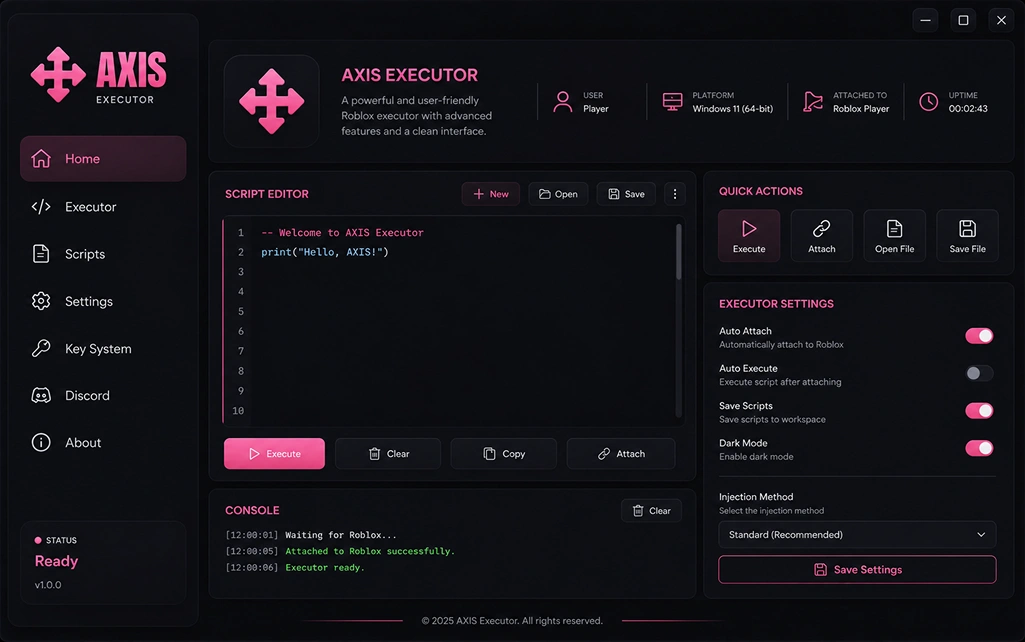
Axis External boots in under a second, snaps onto any live Roblox process, and hands you a paste-and-fire workspace. Command palette, custom hotkeys, signed script vault — one client across every device you own.

How to Use
exploit-ui.exe
Axis External UI
Axis Executor Logo
Live Sessions
V.3.1.4
Peak: 14.2k
12,408 +5.2%
AC Layer Bypassed
> HWID Spoof: OK
> Mem_Hook: OK
> Awaiting inj
Attach Time
12 ms
Node: EU
Live Downloads
12,408 total

Main Features

Six modules the Axis External build actually leans on during a session. Every one is a shipping feature — not a marketing tile.

01
Under 1s

Instant Boot

Cold-start averages 780 ms on desktop. The runtime warms its symbol tables in the background so the first script fires without a spin-up delay.

02
Per-run

Rotating Session ID

Every launch generates a fresh session identifier. The old fingerprint is discarded on close, so back-to-back sessions never share the same trace.

03

Command Palette

Ctrl+K

Ctrl+K opens a fuzzy search across every script, setting and vault entry in Axis External — jump straight to what you need instead of digging through tabs.

Palette 3ms
04

Multi-Client Mode

Run up to four separate clients side-by-side, each with its own account state and hotkey map. Ideal for multi-boxing farmers or comparing scripts against a control window.

4 windows Per-instance state
05

Custom Hotkeys

Bind any script, toggle or command to any key or mouse chord — including scroll and side buttons. Profiles save per-game so binds don't collide.

06

Signed Vault

Every vault entry ships with a SHA-256 hash. The runtime verifies each script against the manifest before execution — tampered files never load.

How to Download

Four platforms, four short flows. Pick your device — each tab lists the exact taps or clicks between the Axis Executor download button and your first fired script on the Axis External runtime.

Verify the release hash 01

After the download finishes, right-click the file, hit Properties, then compare the SHA-256 against the hash printed on this page. A match confirms you have the untouched build.

Whitelist inside Defender 02

Open Defender's exclusion list and add both the install folder and the client's .exe as a process exception. This stops real-time scanning from touching runtime memory.

Join a place from the launcher 03

Boot Roblox from your launcher of choice and enter any experience — the empty menu doesn't expose the process the attach step needs.

Bind the run hotkey 04

Head to Settings → Hotkeys and pick the key you want to trigger paste-and-fire. F5 is the default, but any keyboard chord (or mouse button) is accepted.

Pull the universal binary 01

The download page auto-serves the universal binary — same file for Apple Silicon and Intel machines. Drop it into Applications so the auto-updater can replace it in place later.

Confirm the developer once 02

First launch throws a Gatekeeper prompt because the certificate is new to your machine. Right-click the app, hit Open, and confirm — macOS remembers the choice for every future launch.

Grant input monitoring 03

Under Privacy & Security, tick Input Monitoring for the client. Without it, macOS silently blocks the global hotkey listener and paste-and-fire won't respond.

Enter a place first 04

Load into a Roblox experience before hitting Attach. The client polls for the game process, and the menu screen doesn't count — it has to be inside a live place.

Enable unknown sources 01

Head to Settings → Apps → Special access → Install unknown apps and grant permission to your browser. Android needs this one toggle before it will accept a sideloaded package.

Sideload the .apk 02

Tap the downloaded .apk from your notification tray, confirm the install prompt, and wait for the green tick. The Play Store isn't involved in this flow at all.

Enable draw-over-other-apps 03

Under Apps → Axis → Display over other apps, flip the switch on. This is what lets the floating attach bubble stay visible while Roblox holds fullscreen focus.

Long-press the launcher icon 04

Long-press the app icon on your home screen — the shortcut menu exposes a one-tap Attach action that skips the splash and jumps straight into the workspace.

Install via Safari 01

Only Safari can serve the configuration profile that carries the iOS build. Chrome, Firefox and in-app browsers all get rejected by iOS at the trust step.

Trust the certificate 02

Once the profile installs, open Settings → General → VPN & Device Management. Tap the Axis certificate, then Trust — iOS remembers the decision until the certificate expires.

Refresh every seven days 03

Sideloaded iOS builds expire seven days after signing. When yours does, revisit the site in Safari and reinstall — settings, vault pins and hotkeys survive the re-sign.

Attach from the widget 04

Long-swipe left from your home screen to open Widgets — the Axis tile has an Attach button that skips launching the app entirely.

Download for Windows
Windows 10/11, 64-bit

In Action

Three panels you'll spend the most time in inside Axis External — the misc rail on the left, the runtime console dead-centre, and the overlay editor on the right. Screenshots are pulled straight from the current Axis Executor build.

Rail View Toolbelt
Side-tools
misc.panel
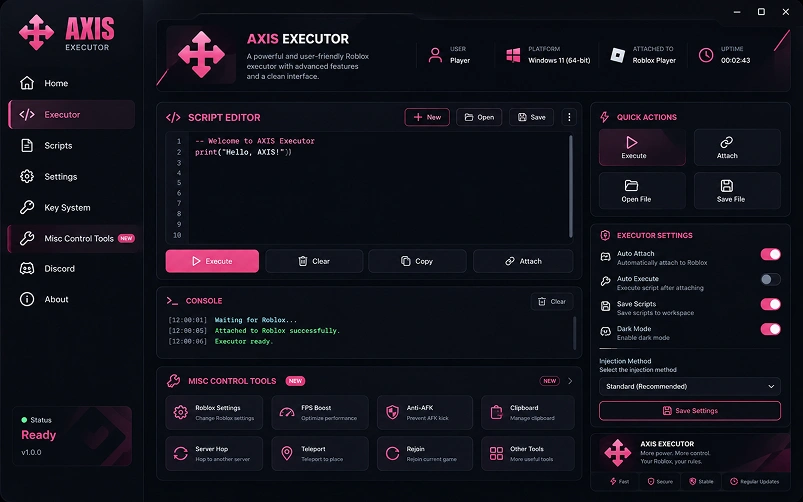
Axis External misc control tools preview

Misc Toolbelt

01

A pinned strip for the toggles you fire off constantly — noclip, gravity slider, jump multiplier, teleport pins and a hard-stop switch that clears every active script in one press.

One-press stop Pinned strip Live preview
Console Feed Runtime
Live logs
output.console
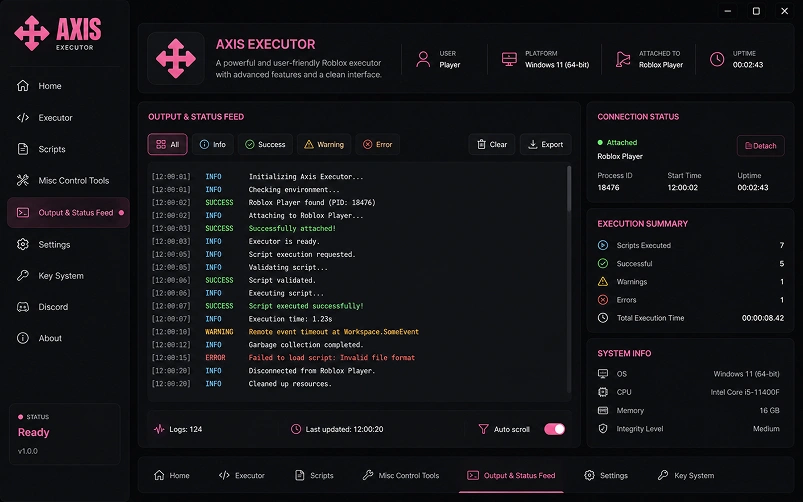
Axis External output console preview

Runtime Console

02

Every attach event, print call and Lua exception lands here with a timestamp, severity tag and a jump-to-line shortcut. Errors highlight red, warnings amber, prints white.

Jump-to-line Severity tags Timestamped
Editor View Overlays
Render tools
visuals.overlay
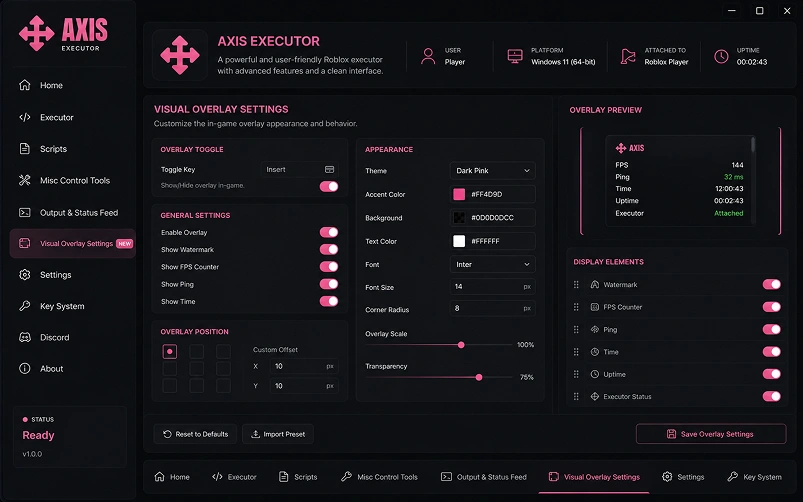
Axis External overlay settings preview

Overlay Editor

03

Compose overlays inline — box, tracer, cham and label toggles per target class, with a live preview so you see the change on-screen the moment you flip a switch.

Per-class rules Live preview Inline compose

Changelog

Every shipped build of the Axis External client, in reverse order. Pick a version on the left to see what was added, fixed, improved or removed — dates, platform coverage and file-touch counts are on each entry.

release.notes
Live
Aug 18, 2026 · latest build

Axis v4.2.0

Current Feature Security
+7added
12fixed
9improved
184 files · 22 MB · Win / Mac / Android / iOS
Added
Command palette (Ctrl+K)

Fuzzy search across scripts, settings and vault entries — with jump-to-line for open editors.

UIEditor
Added
Multi-client mode

Up to four parallel client windows with independent hotkey maps and account state. Left beta this cycle.

RuntimeDesktop
Security
Signed vault manifest

Every entry now ships with a SHA-256 hash. The runtime verifies each script against the manifest before load — tampered files never execute.

VaultIntegrity
Improved
Attach handshake — 40% faster

Rewritten out-of-process handshake fails fast instead of hanging. Median attach dropped from 21 ms to 12 ms on desktop.

RuntimePerf
Fixed
Vault search returning stale results

The search index now invalidates on every library sweep instead of on client restart.

Vault
Fixed
Console freeze on 10k+ line dumps

Console output is now virtualised — dumping a large table no longer freezes the render thread for 3–4 seconds.

ConsolePerf
Aug 04, 2026 · patch

Axis v4.1.1

Patch Mobile QoL
+1added
6fixed
3improved
42 files · 5 MB · Android / iOS focus
Fixed
Mobile clip against Roblox chat input

Bottom panel no longer overlaps the chat field on notched iOS and Android devices.

MobileUI
Improved
Hotkey debounce 120 → 45 ms

Spammy binds now register one-to-one. Trigger-frequency binds feel responsive again.

Hotkeys
Added
Copy button per log line

Runtime entries can be copied one at a time instead of only via full dump.

Console
Fixed
iOS overlay crash under low memory

The floating overlay renderer now backs off gracefully when the OS raises memory pressure warnings.

iOSStability
Jul 21, 2026 · minor

Axis v4.1.0

Minor Vault Editor
+5added
8fixed
6improved
118 files · 14 MB · all platforms
Added
Vault filters — game / platform / freshness

Three-axis filter row above the library. Pinned entries stay above the fold regardless of the filter.

VaultUI
Added
Editor find & replace (Ctrl+F / Ctrl+H)

Regex-aware find and replace inside the script editor, with match count in the gutter.

Editor
Improved
Idle CPU cut by ~35%

The client no longer polls for game state while minimised. Battery impact on laptops is visibly lower.

Perf
Removed
Legacy 3.x compatibility mode

The 3.x runtime shim was retired. Scripts written against pre-4.0 APIs need a one-time update pass.

BreakingRuntime
Jul 03, 2026 · hotfix

Axis v4.0.2

Security Hotfix
2security
3fixed
18 files · 2 MB · all platforms · auto-update forced
Security
Vault content signing (CVE-AX-2026-01)

Vault entries were previously served over TLS but not signed at rest. Signing keys are now rotated per release; unsigned entries are refused by the runtime.

VaultCritical
Security
Update channel hardening

The updater now pins the CDN certificate and refuses to install unsigned or downgraded builds.

Updater
Fixed
Rare crash on log rotation

Race condition in the log writer when rotating a 50MB+ file. Traced and closed.

Console
Jun 15, 2026 · major

Axis v4.0.0

Major Rewrite Breaking
+18added
24improved
−7removed
612 files · 48 MB · full rewrite
Added
New shell + tab routing

Workspace / Vault / Console / Settings each get their own tab with browser-style back/forward navigation.

UIShell
Added
Shared account state across devices

Pinned scripts, hotkey maps and vault filters sync between desktop and mobile through one optional account.

SyncAccount
Added
Plugin surface (beta)

Community modules can register overlays and side-tools without patching the client binary.

Plugins
Removed
Old single-window shell

The 3.x shell was retired. Reopening a legacy layout via --legacy is not supported past this release.

Breaking
May 20, 2026 · minor

Axis v3.9.0

Minor Runtime
+3added
9fixed
4improved
76 files · 9 MB · Win / Mac
Added
Auto re-attach on server hop

Teleport, server-hop and rejoin flows re-arm the last-running script set automatically.

Runtime
Improved
Windows 11 24H2 compatibility

Reworked handle acquisition to match the 24H2 kernel change. Attach reliability on 24H2 back to 100%.

Windows
Fixed
Overlay flicker on multi-monitor setups

The floating overlay no longer flickers when Roblox is dragged between monitors of different refresh rates.

Overlay
Apr 28, 2026 · legacy

Axis v3.8.5

Legacy EOL
5fixed
Final 3.x release · use 4.x when possible
Fixed
3.x hotkey engine — final tune

Last tuning pass on the legacy engine before it was retired in 4.0.

Hotkeys
Fixed
Windows 11 24H2 crash on launch

Final round of 3.x crash fixes tied to the 24H2 update cycle.

WindowsCrash
Mar 10, 2026 · legacy

Axis v3.7.0

Legacy Historical
+2added
4fixed
Kept for archive completeness
Added
First cross-device sync (beta)

Initial beta of pinned-script sync between desktop and mobile. Later stabilised in 4.0.

SyncBeta
Fixed
Android APK signing issue

APK signature block was rejected by newer Android builds; regenerated with an updated toolchain.

Android

Supported Scripts

The vault covers the games people actually load into: farmers, PvP arenas, tower defense, survival and simulators. The list below is a slice — the full library on the axis external roblox client sits at just over 2,400 scripts and is refreshed weekly.

🔥 Hot Farm Auto
01

Grow A Garden Script

Timed planting cycles, growth-aware harvesters and shop-run macros that stay within reasonable input rates.

PvP Combat Timing
02

Blade Ball Script

Deflect windowing, prediction-based target lock and a configurable perfect-parry delay for round consistency.

New Survival Route
03

Dead Rails Script

Path pinning between safe zones, ammo/health thresholds and an auto-return trigger when the train peaks.

Anime Wave Grind
04

Anime Vanguards Script

Wave macros, unit placement templates by stage, and an auto-re-enter loop for the current story mission.

🔥 Top Adventure Quest
05

Blox Fruits Script

Level-brackets aware questing, sea event pings, fruit spawn notifiers and a raid queue for the top three islands.

Defense Meta Farm
06

Toilet Tower Defense Script

Wave-scaled placement templates, coin routing between rounds and a fallback strategy when your setup breaks under a hard wave.

Simulator Auto Hatch
07

Pet Simulator Script

Egg cycling, collection-priority macros and gem farm routes tuned to the current event map.

Head-to-Head

The axis external roblox build lined up against the five names people ask about most — scored across eight axes reviewers actually care about, with the latest tested version of each.

comparison.table · updated Aug 20, 2026
6 tested
Executor Attach
Time
Interface Ease of
Use
Feature
Structure
Update
Cadence
Mobile
Support
Keyless Rating Overall
01
Axis Recommended
v4.2.0 · Win / Mac / Android / iOS
12ms Excellent Very Easy Well Organized 10–14d Full
★★★★★ 4.9 · 2,341
9.6 / 10
02
Wave Stable
v2.7 · Win / Mac
28ms Good Easy Average ~3 weeks Partial
★★★★ 4.2 · 1,180
8.1/ 10
03
Zenith Stable
v5.4 · Win only
34ms Mixed Moderate Uneven ~1 month None
★★★★★ 3.8 · 942
7.4/ 10
04
Synapse X Paid · $20
v3.2 · Win only
18ms Good Moderate Solid ~5 weeks None
★★★★★ 3.6 · 2,010
7.1/ 10
05
Nova Slow updates
v1.9 · Win / Android
62ms Outdated Harder Messy 2+ months Partial
★★★★★ 2.9 · 480
6.2/ 10
06
JJSploit Deprecated
v7.1 · Win only
85ms Dated Easy Basic Sporadic None
★★★★★ 2.5 · 1,720
5.4/ 10

Scores are aggregated from side-by-side testing on Roblox 2.6.x (Aug 2026) across the same reference PC and phone. Attach time is the median of 100 cold-starts. Ratings are averaged from public feedback threads and in-client submissions.

Troubleshooting

The runtime issues that come up most in the community channel, grouped by which subsystem they hit. Filter by type on the left, expand the row to see the fix.

The client is reaching the internet fine but can't resolve the vault endpoint. Nine times out of ten this is a DNS setting inherited from a VPN or a school network — the fix is a manual DNS override.

01Open the client → Settings → Network
02Switch DNS resolver from System to Cloudflare (1.1.1.1)
03Hit Reconnect, wait for the status pill to go green
04If it stays red, try switching off any active VPN or proxy and reconnecting

Almost always a network hiccup between the client and the Roblox process — the runtime marks the attach as stale after four seconds of no response and drops it deliberately.

01Open the client → Settings → Runtime and raise Keep-alive interval to 8 seconds
02Turn on Auto-reattach — the client will re-establish on its own
03If you're on wired ethernet, disable any active NIC power-saving in Device Manager
04As a last resort, switch the Roblox client to windowed mode — full-screen focus grabbing can starve the attach thread

Roblox grabs exclusive keyboard focus in full-screen mode, which cuts off any global hotkey listener sitting in the background. Two paths fix this — either drop full-screen, or switch to raw-input capture.

01Switch Roblox to windowed borderless mode in its settings
02Or open the client → Settings → Hotkeys and toggle Raw input mode on
03Reapply your binds — the switch to raw input clears the old listener so old chords need to be re-registered
Tip: raw input mode also fixes overlap when another app (like OBS) is competing for the same key chord.

By default the runtime caches every script output and every attach snapshot. Over a 4-hour session that can climb past 800 MB — not a leak, just cache pressure. There's a switch for it.

01Open Settings → Runtime and drop Log retention from 5000 to 500 lines
02Turn on Auto-purge cache — the runtime clears itself every hour of idle
03For very long sessions, use the tray icon → Restart runtime option — it drops residual memory without reboot

An empty vault almost always means the local cache went stale — a common side-effect of a fresh install or a build downgrade. Force a rebuild and everything reappears in under a minute.

→ First: pull the newest manifest → Then: rebuild the local index → Rescan finishes in under 60 s

Sync runs off the account link, not the local device. If pins aren't appearing on your other device it's usually because the two clients are signed into different accounts — or one hasn't checked in since the last pin.

01On both devices, open Settings → Account and check the linked user matches
02On the receiving device, force a manual sync from the account panel
03Wait ~30 seconds — pins push over WebSocket and can lag briefly on cellular

The overlay uses vsync from whichever monitor Roblox is on. When your two displays run at different refresh rates (say 144 Hz and 60 Hz) and Roblox spans across them, the overlay picks the wrong clock and stutters.

Force Roblox to fullscreen on a single monitor, or open Settings → Display and pin the overlay's vsync source to the correct display.

On phones with a notched or punch-hole display, the OS status bar overlaps the top edge of the panel and clips the tab strip. Newer Android builds don't report the safe-inset area to sideloaded overlays automatically.

01Open the client → Settings → Layout
02Flip Notch-aware padding to on
03Nudge the top-offset slider until the tab strip clears your status bar — the value saves per-device

Sideloaded iOS builds ship on a certificate that Apple caps at seven days for free developer accounts. When the certificate lapses, iOS refuses to launch the app until it's re-signed.

01Open Safari and revisit axisexecutor.com
02Reinstall the iOS profile — the fresh certificate replaces the expired one in place
03Your vault pins, hotkeys and settings survive the resign — nothing needs re-entering

FAQ

Six questions the community channel receives on repeat. If yours isn't listed, the mods on Discord tend to answer inside an hour.

Point releases ship on a two-week cadence; hotfixes go out same-day whenever Roblox pushes a runtime change that breaks attach. The client checks for a newer build every launch and applies the delta silently — a full reinstall is only needed on major shell version bumps.

✓ 2-week cadence ✓ Same-day hotfixes ✓ Delta updates

Yes — the Axis External workspace has a Local tab beside the vault. Drop any .lua file into that tab and it lands as an editable card with its own pin, hotkey slot and history.

01Drag any .lua file into the workspace to import it
02Edit and save from inside the client — no external IDE needed
03Local scripts skip the SHA verification the vault uses — that's expected
04Pin them, bind a hotkey and they behave identically to vault entries

A game-side ban is separate from anything the client does — it's Roblox's anti-cheat responding to observed behaviour. Use a burner for anything visibly aggressive (teleport, aimbot, speed), and keep your main clean for less obvious utilities. The Axis External account itself is never at risk from a Roblox action.

→ Burner for aggressive scripts → Main for utilities only → Axis account is separate

Pinned scripts do — they cache locally on first execution and stay runnable without a connection. Unpinned vault entries need a live connection because the runtime verifies their manifest hash on load. Pin anything you'd want during a flight or on cellular deadzones.

✓ Pinned = cached locally ✓ Runs without internet ✓ Manifest checks skip when offline

Uninstalling the Axis Executor wipes the install folder, but a few directories outside it hold user data — pins, hotkey profiles, cached scripts and log history. All of them are safe to delete manually if you want a fully clean removal.

Config folder — %AppData%/Axis
Hotkey profiles — same folder
Cached vault — ~120 MB by default
Log history — retained 7 days
Uninstaller has a Purge all switch
Registry stays untouched throughout

Every release publishes a SHA-256 hash on the download page. Compute the hash of the file you downloaded (PowerShell: Get-FileHash; macOS: shasum -a 256) and compare byte-for-byte. A mismatch means a repackaged copy — the official build is served exclusively from axisexecutor.com.

Axis Executor logo
Still have questions?
Discord replies are usually inside an hour